Facebook Twitter VKontakte
Sign in
  • Home
  • Human Eye Project
    • The Pupil
    • Pupil Decentration-Multiformaties
    • Pupil Deformations
    • Pupil Color and Dimensions
    • Pupil Anisocoria
    • Pupil Miosis
    • Pupil Mydriasis
    • Pupil Reflexes
    • The Collarette
    • The Iris
  • PupilMetrics App
    • PupilMetrics Android
    • PupilMetrics Windows
    • PupilMetrics Mac OS
  • Documentation
  • Pricing
  • Learn More
    • CNRI Research
    • History
    • About
    • Eye Photo Tips & Tricks
    • IRB Status
    • Pupil Abstract Blog
    • Privacy Policy
    • Terms of Service
Sign in
Welcome!Log into your account
Forgot your password?
Password recovery
Recover your password
Search
Sign in
Welcome! Log into your account
Forgot your password? Get help
Password recovery
Recover your password
A password will be e-mailed to you.
Clinical Neuro-Optic Reseach Initiative
  • Home
  • Human Eye Project
    • The Pupil
    • Pupil Decentration-Multiformaties
    • Pupil Deformations
    • Pupil Color and Dimensions
    • Pupil Anisocoria
    • Pupil Miosis
    • Pupil Mydriasis
    • Pupil Reflexes
    • The Collarette
    • The Iris
  • PupilMetrics App
    • PupilMetrics Android
    • PupilMetrics Windows
    • PupilMetrics Mac OS
  • Documentation
  • Pricing
  • Learn More
    • CNRI Research
    • History
    • About
    • Eye Photo Tips & Tricks
    • IRB Status
    • Pupil Abstract Blog
    • Privacy Policy
    • Terms of Service

Getting Started

5
  • 1.1 System Requirements
  • 1.2 Installation
  • 1.3 Licensing
  • 1.4 First Launch
  • 1.5 Desktop Window & Keyboard Shortcuts

Capturing Eye Images

8
  • 2. Capturing Eye Images
  • 2.1 Camera Source Selection
  • 2.2 Quality-Gated Camera Mode – Android App
  • 2.3 Manual Camera Mode – Android
  • 2.4 USB / UVC Iriscope (Dino-Lite)
  • 2.5 PLR Video Mode – Android
  • 2.6 Import from Gallery
  • 2.7 Tips for a Good Capture

Reading the Analysis Results

10
  • 3. Reading the Analysis Results
  • 3.1 The Iris Zone Map
  • 3.2 PI Ratio (Pupil–Iris Ratio)
  • 3.3 Zone Findings — Flattenings (FLAT) and Protrusions (PROT)
  • 3.4 ANW Assessment (Collarette / Autonomic Nerve Wreath)
  • 3.5 Decentration (Pupil Position)
  • 3.6 Ellipseness (Pupil Shape)
  • 3.7 Anisocoria (Pupil Size Difference)
  • 3.8 Confidence Scores & Hybrid Fusion
  • 3.9 Scan History

Patient Management

4
  • 4. Patient Management & Exports
  • 4.1 PDF Report
  • 4.2 Plain-Text & JSON Export
  • 4.3 Sharing & Filing

Natural Medicine Therapy Panels

8
  • 5. Natural Medicine Therapy Panels
  • 5.1 Enabling the Therapy Modules
  • 5.2 How Zone Findings Drive the Therapy Panels
  • 5.3 Herbal Recommendations Panel
  • 5.4 Nutrition Recommendations Panel
  • 5.5 Chiropractic Correlations Panel
  • 5.6 TCM Correlations Panel
  • 5.7 Reading Therapy Panels Together

Constitutional Iridology

7
  • 6. Constitutional Iridology
  • 6.1 Background & Theoretical Basis
  • 6.2 The 34 Constitutional Types
  • 6.3 Selecting a Constitutional Type
  • 6.4 Constitutional Panel in Analysis Results
  • 6.5 Constitutional Section in the PDF Report
  • 6.6 Clinical Guidance & Limitations

Exporting PDF Reports

2
  • 7. Exporting PDF Reports
  • 7.1 Regenerating a PDF

Settings & Customization

5
  • 8. Settings & Customization
  • 8.1 Languages
  • 8.2 Zone Overlay & Observer Notes
  • 8.3 ML Comparison Panel
  • 8.4 About & Support

Clinical & Legal Disclaimers

2
  • 9. Clinical & Legal Disclaimers
  • 9.1 Data Privacy
View Categories
  • Home
  • PupilMetrics Documentation
  • Settings & Customization
  • 8.2 Zone Overlay & Observer Notes

8.2 Zone Overlay & Observer Notes

< 1 min read

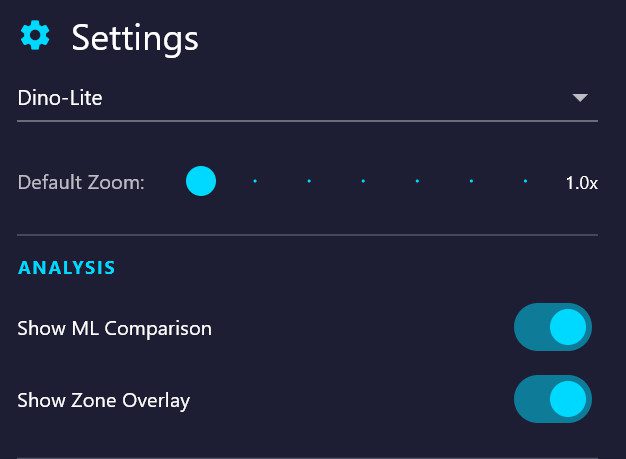
When **Show zone overlay** is on, the iris photo on the results screen displays an interactive polar overlay. Each clock-hour sector is tappable:

– Tap any zone to open its detail panel showing all FLAT/PROT/ANW findings in that zone, the associated organ system, and a text field for **observer notes**.

– Observer notes are free-form text written by the practitioner. They are included as a named section in both the TXT report and the PDF report under “Observer Notes / Zone Overlay”.

– Notes are session-local — they are not stored in the database between sessions.

Updated on March 24, 2026

What are your Feelings

  • Happy
  • Normal
  • Sad

Share This Article :

  • Facebook
  • X
  • LinkedIn
  • Pinterest
8.1 Languages8.3 ML Comparison Panel

The Clinical Neuro-Optic Research Initiative (CNRI) advances pupil-based neurodiagnostics by preserving historical insights, developing modern analytic tools, and researching links between ocular microstructures and systemic health. Our mission is to validate and expand neuro-optic biomarkers for breakthroughs in early detection, monitoring, and non-invasive assessment of autonomic and neurological function.

Twitter